Creating accurate, fast and useful reports is only part of the job - effective methods of deploying reports is critical for wide adoption.
Deployment Whitepaper
Using Apps to distribute content See the Data engineer section for using custom navigation with APPs
Excel as a client
Excel can be an excellent tool for self service analysis - however, there are a few things that need to be done for your data model to be effective. Power BI has the concept of implicit and explicit measures.
This image is of two implicit measures - Sales Qty and SalesAmount
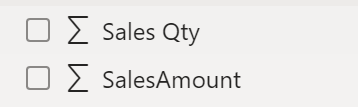
Implicit measures are any numeric column and these are set to Sum as a default aggregation method.
Explicit measures are DAX calculations that summarize data.
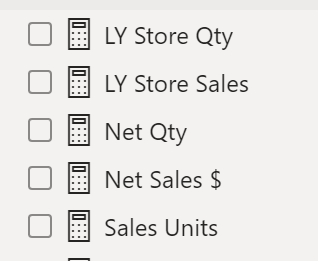
These are explicitly defined measures. For example, Sales Units = Sum([Sales Qty]) and Net Qty = sum([Sales Qty])-sum([Returns Qty])
Excel ONLY understands explicit measures - so if you want users to be able to use Excel as a tool then make sure you create explict measures!
While not specifically for a report developer, the adoption framework might be a useful read for a strategy to drive adoption across the organization. Adoption roadmap
Information discovery
Users want to be certain that the reports and datasets they are using have accurate data. Power BI has the ability for datasets, dataflows, reports and apps to be Endorsed
Endorsement has two option: Promoted and Certified Promoted is the self service model - any report creator can Promote their content. By promoting it, they are saying that they believe the content to be accurate. Certified is a managed process. A limited number of users can be assigned this authority. They have the responsibility to ensure the quality of the content.
Dataset discovery
You can help uses discover your data - this helps them get the answers they need without duplicating data or effort.
Datahub
Making datasets discoverable
Premium feature
Power BI Premium has a deployment feature that allows content to be promoted from a development workspace, to a test workspace and finally a production workspace. Each step can update connections and parameters.
Deployment Pipelines